Publer Review 2026: Why We Can’t Live Without It Anymore
Look, I’ve been using Publer since May 2020. That’s not a typo. Nearly five years of scheduling posts, managing multiple brands, and watching this tool evolve from a scrappy AppSumo deal into something our entire social media operation depends on.
We manage around 30 social media accounts across three brands. Ten accounts per brand, give or take. Before Publer, we were on Buffer. And we’d looked at Hootsuite (briefly) before the pricing made us close that browser tab real fast. The sticker shock was real.
So when I say this Publer review 2026 comes from actual daily use? I mean daily. Sometimes hourly. This isn’t a “I tested it for two weeks” situation. This is years of real workflow, real posts, real results.
Table of Contents
The Thing That Actually Matters: Scheduling That Doesn’t Suck
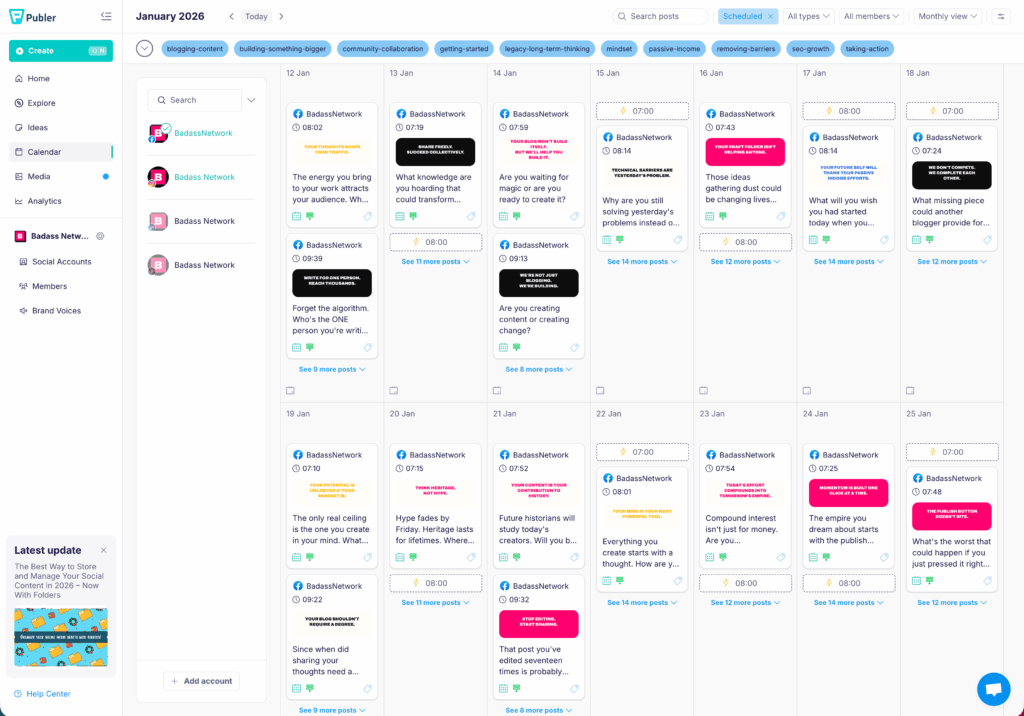
Here’s what sold me on Publer originally, and what keeps me here: I can schedule content a year in advance. A full year. In bulk.
That sounds like a small thing until you’ve experienced the alternative. Logging into five different platforms every single day. Copying and pasting the same post with slight tweaks. Watching your afternoon disappear into the social media void. It’s exhausting, and honestly? It’s unnecessary in 2026.
With Publer, social media went from being this constant weight on our shoulders to actually kind of fun. Or at least manageable. We batch our content creation now. Sit down on a Monday, plan out weeks or months of posts, upload everything via CSV (more on that gold mine later), and then just move on with our lives. The mental freedom alone is worth whatever Publer pricing tier you end up on.
The bulk scheduling works on both their desktop app and mobile. That second part matters more than you’d think. I’ve approved posts from airport lounges, edited captions from my couch, rescheduled content during lunch breaks. The mobile experience isn’t some watered-down afterthought. It actually works. Like, really works.
And the interface? Clean. Intuitive. Not cluttered with a million features you’ll never touch. You can be scheduling your first post within minutes of signing up. No extensive onboarding required. No YouTube tutorial rabbit holes. Just connect your accounts and go.
Per-Platform Customization (Or: Why Your Posts Don’t Look Broken Anymore)
Okay, this might sound basic. But Publer lets you customize each post for each platform before it goes out.
Same core message. Different character limits. Different hashtag strategies. Different image formats. You write once, then tweak for LinkedIn’s professional vibe, Instagram’s visual focus, and Twitter’s (sorry, X’s) brevity requirements. All from one screen.
Why does this matter? Because content that looks native performs better. Period. A post that’s clearly been copy-pasted across platforms with weird truncation or missing hashtags? Your audience notices. It looks lazy. It looks automated in the bad way. The kind of automated that screams “I don’t actually care about this platform.”
Publer handles all of this in one interface. Write the post, see the preview for each platform, adjust what needs adjusting, schedule, done. We probably save 15-20 minutes per post just from not having to manually reformat everything. Multiply that across dozens of posts per week and you’re looking at hours saved.
Is this the sexiest feature? No. But it’s the kind of thing that compounds over hundreds of posts per month. The unsexy features are usually the ones that actually matter for your workflow.
Real Talk About What Publer Can’t Do
No Publer review 2026 would be honest without mentioning the limitations. So here they are. No sugarcoating.
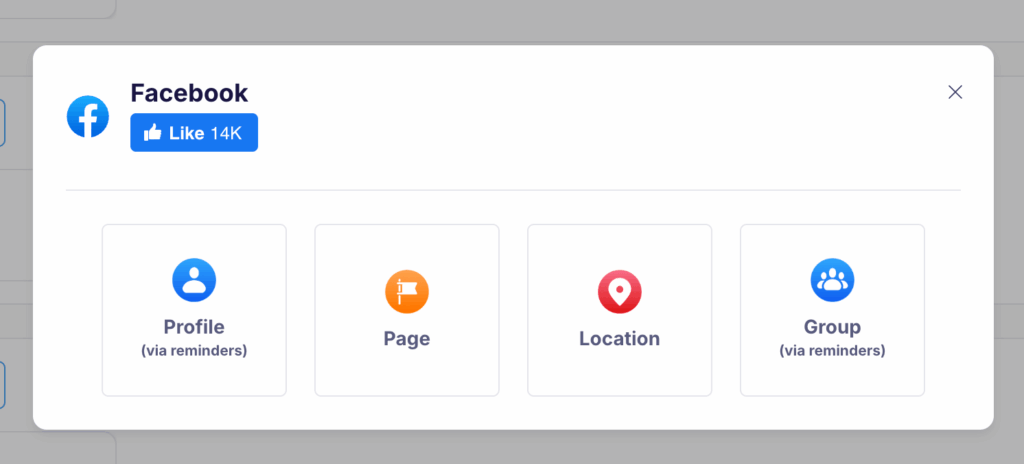
You can’t publish directly to your personal Facebook profile. This drives people crazy until they understand why. It’s a Facebook API restriction, not a Publer problem. Facebook simply doesn’t allow third-party tools to post to personal profiles anymore. Hasn’t for years. Publer works around this with mobile reminders that make manual posting easier, but yeah. It’s not automatic. If personal profile posting is your main need, you should know this upfront.
Same deal with X (Twitter). Their API costs have skyrocketed. We’re talking tens of thousands of dollars monthly for platforms like Publer to maintain that connection. Publer passes some of that cost through to users who need X integration. Again, not Publer’s fault. Blame Elon. But it’s worth knowing before you sign up expecting everything to be included in the base Publer pricing.
These are platform-level limitations that affect every scheduling tool on the market. I’ve seen people leave one-star reviews over this stuff without understanding the actual cause. Don’t be that person. Do your research on what each social platform allows via API before blaming any tool.
Five Years of Reliability (And Why That Actually Matters)
I’m trying to remember a significant outage or bug that affected our posting. I genuinely can’t.
Five years. Thirty accounts. Thousands upon thousands of posts. And the thing just works.
Posts fail occasionally. Maybe once every few days (out of hundreds if not thousands of posts) something doesn’t go through. But that happens with every tool, and usually it’s a platform hiccup on Facebook or Instagram’s end, not Publer. No major outages I can recall. No “sorry, we lost all your scheduled content” disasters. No interface overhauls that broke everything we’d learned and forced us to relearn the entire system.
The platform has stayed remarkably current too. New features roll out regularly. They added support for newer platforms as they gained traction. TikTok, Threads, Google Business Profile. The whole thing feels actively maintained, not abandoned. That matters when you’re building your business operations around a tool.
Their support deserves a mention here. The help documentation is genuinely extensive. I’ve solved 90% of my questions just searching their knowledge base. Detailed articles with screenshots, video walkthroughs, the whole deal. And when I’ve actually needed human help? Responses within minutes to a few hours. Not days. Not “we’ll get back to you eventually.” Actual fast, useful support from people who clearly know the product.
For context, I’ve used tools where support tickets sat unanswered for weeks. Publer isn’t that. Not even close.
The CSV Import Feature Nobody Talks About
Okay. Listen. If you’re evaluating Publer and you’re not paying attention to the CSV import, you’re missing the whole point.
This feature is gold. Absolute gold.
You can bulk upload hundreds of posts via a single spreadsheet. Plan everything in Google Sheets or Excel. Dates, times, captions, image URLs, platform targeting. Then import it all at once. Boom. Months of content scheduled in minutes.
We use this for campaign launches, seasonal content, recurring posts, basically anything where we’re dealing with volume. The time savings are absurd. I’m talking what used to take an entire day now takes maybe 30 minutes. I don’t know why more people don’t talk about this feature in their Publer reviews. Maybe they haven’t discovered it yet. Maybe they’re scared of spreadsheets.
The learning curve for CSV formatting is maybe 20 minutes. Publer provides a template. Follow the column structure, populate your content, upload, verify everything looks right, schedule. That’s it.
If you’re managing multiple brands or running an agency, this single feature might justify the entire Publer pricing investment on its own. Seriously. It’s that good.
Publer Pricing Compared to the Alternatives (This Is Where It Gets Interesting)
I got lucky. AppSumo lifetime deal back in 2020. But let’s talk about what you’d actually pay today, because the value proposition still holds up even at full price.
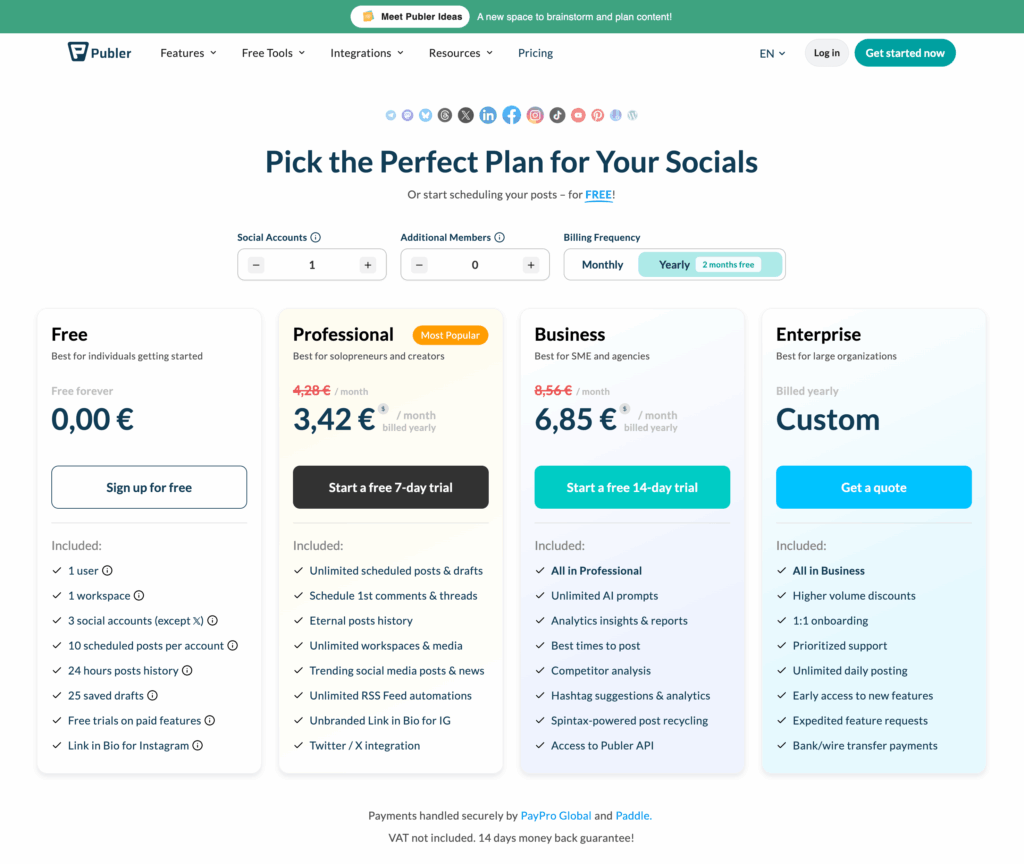
Here’s the current Publer pricing breakdown. Their Professional plan runs about $12 per month with 3 social accounts included. The Business plan is $21 per month, also starting with 3 accounts. You pay extra as you add more accounts beyond that base. For managing the volume we handle (around 30 accounts), you’re probably looking at $50-100 monthly once you scale up.
Now let’s compare that to what else is out there.
Buffer charges per channel. Their Essentials plan is $5-6 per channel per month. Their Team plan jumps to $10-12 per channel. Do the math on 30 accounts and you’re looking at $150-360 per month. That adds up fast, especially for agencies or multi-brand operations.
Hootsuite? They killed their free tier entirely a while back. Their basic Professional plan is $99 per month and only covers 10 social accounts. Need to manage 20 or more? You’re jumping to their Team plan at $249 per month. And even then, you’re capped at 20 accounts with only 3 users. Need more? Enterprise pricing. Custom quotes. Big money.
So when we talk about Publer pricing in context, the picture gets very clear very fast. For the same functionality (or better, honestly), you’re paying a fraction of what the big names charge. We’re talking potential savings of $100-200+ per month compared to Hootsuite. That’s $1,200 to $2,400 per year you’re keeping in your pocket.
Would I pay for Publer if my lifetime deal disappeared tomorrow? In a heartbeat. Wouldn’t even hesitate. The Publer pricing structure just makes sense for anyone managing multiple accounts.
Who Should (And Shouldn’t) Use Publer
Let me be specific here because not every tool is right for everyone.
You should absolutely consider Publer if you’re publishing to social media daily or near-daily. If you’re managing multiple accounts, whether that’s for one brand across platforms or multiple brands entirely. If you want to batch your content creation and schedule weeks or months in advance. If you’re tired of paying enterprise prices for basic scheduling functionality. If CSV imports and bulk operations sound appealing to your workflow.
Publer might not be your best fit if you only post occasionally and don’t need scheduling. If you’re exclusively focused on personal profile posting (remember those API limitations). If you need heavy-duty social listening or advanced analytics. Publer has analytics, but they’re not as deep as dedicated analytics platforms. If you’re a massive enterprise that needs custom contracts and dedicated account managers. Publer is built more for individuals, small teams, and agencies than Fortune 500 social media departments.
For everyone in that middle ground? The people publishing regularly, managing real accounts, trying to make social media sustainable without burning out or going broke? Publer hits a sweet spot that’s hard to find elsewhere.
The Bottom Line for Anyone Publishing Daily
If you’re posting to social media every day, or even a few times a week across multiple accounts, you need a tool like this. We literally cannot imagine running our social presence without Publer anymore. And yes, I know that sounds dramatic. I don’t care. It’s true.
The scheduling is effortless. The per-platform customization saves hours. The CSV import is legitimately game-changing for bulk content. The Publer pricing undercuts competitors significantly while delivering equal or better functionality. Five years of reliability speaks for itself.
Rating? I told someone the other day it’s a 23.5 out of 10. That’s not a joke rating. That’s five years of genuine appreciation talking. Five years of depending on this tool every single day and never being let down.
Go poke around their free tier. Test the scheduling. Try a CSV import. See if it clicks.
And if you’re still manually posting to each platform individually in 2026? Honestly, we need to talk. There’s a better way.
Managing multiple brands and want to connect with others doing the same? The Badass Network community might be your people.
For more on Publer’s current features and pricing, check publer.com today!