We write blog posts that convert – last year we published a post that brought in 47 email signups in the first month. Not from paid ads. Not from a massive audience. Just organic traffic from a post that did what it was supposed to do.
That same month, we published three other posts. Combined signups from those? Four.
Same writer. Same site. Same audience. The difference was in how the converting post was built. Sharon and I have been doing this long enough (since ’99, if you’re counting) to know that writing blog posts that convert isn’t about tricks or manipulation. It’s about understanding what makes someone actually do something after reading your words.
If you’re just starting out, this stuff can feel overwhelming. There’s so much advice out there, most of it vague or contradictory. So I’m going to break down exactly what we do, step by step, in a way you can actually use today.
Know the One Thing You Want Them to Do
Every post needs a single purpose. Not two. Not “maybe they’ll sign up or share it.” One action.
This sounds simple but it’s where most beginners go wrong. You finish writing a post and think, well, I should add some calls to action. So you throw in a newsletter signup, a link to your product, a request to follow on social media, maybe a link to another post. Feels thorough.
It’s not. It’s confusing. When you give readers multiple options, most of them choose none.
How to actually do this:
Before you write a single word, open a blank document and answer this question: “After reading this post, what do I want the reader to do?” Write it down. One sentence. Examples:
- Sign up for my email list
- Click through to my product page
- Book a discovery call
- Join my community
- Share this post with someone who needs it
That’s your North Star for the entire post. Everything you write should nudge toward that one action.
Here’s what this looks like in practice:
Let’s say you’re writing a post about meal prepping for busy parents, and your goal is email signups. You wouldn’t just write generic meal prep tips and slap a “subscribe to my newsletter” box at the end. Instead, you’d:
- Talk about how meal prepping saves time (the problem your readers have)
- Share a few specific tips that work
- Mention that you have a free weekly meal plan template you send to subscribers
- Make the signup feel like the natural next step: “If you want the exact template I use, drop your email below and I’ll send it over”
See how the whole post builds toward one thing? The email signup isn’t an afterthought. It’s the destination.
Common mistake to avoid:
Don’t pick “I want them to buy my course” for every post. Match the action to where your reader is. Someone who just found you through Google isn’t ready to buy anything. They’re ready to subscribe, maybe. Save the sales pitch for people who already know and trust you.
Write for Scanners First, Readers Second
People don’t read blog posts the way they read books. They scan. They’re hunting for the bit that solves their problem or answers their question. If they can’t find it quickly, they leave.
This used to frustrate me. I’d spend hours crafting perfect paragraphs and watch people bounce after ten seconds. Then I figured out: it’s not rudeness, it’s just how the internet works. Your job is to make scanning easy and rewarding.
How to actually do this:
Step 1: Write subheadings that tell a story on their own.
Go back through your post and read only your H2 headings. Do they make sense? Could someone get the gist of your entire post just from those? If not, rewrite them.
Bad subheading: “Another Important Point” Good subheading: “Put Your CTA Where It Makes Sense”
The second one tells you exactly what that section is about. The first one tells you nothing.
Step 2: Keep paragraphs short.
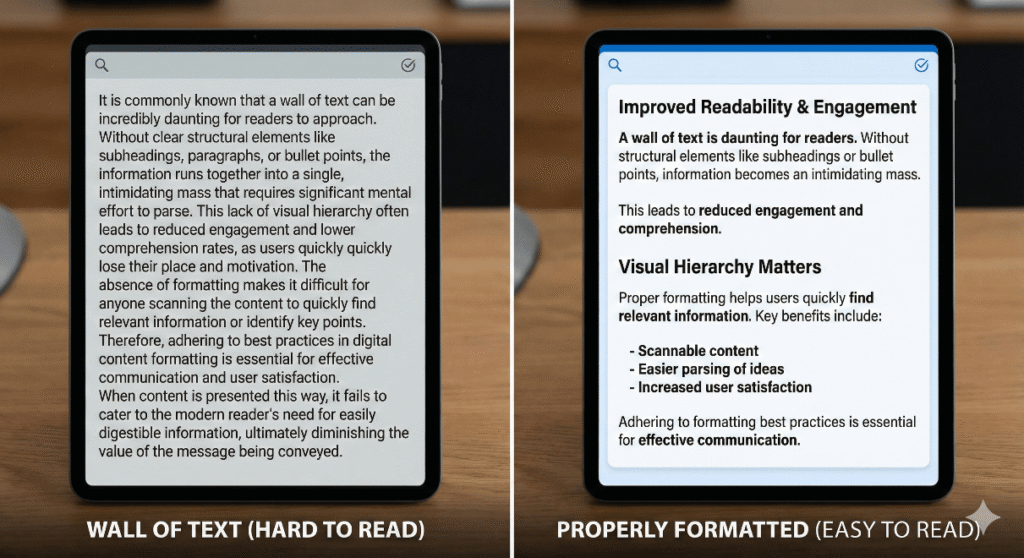
Three to four sentences max. Sometimes just one or two. Long blocks of text are intimidating on screens. When readers see a wall of text, their brain says “this looks like work” and they scroll past.
Look at this section. Notice how much white space there is? That’s intentional. It makes reading feel easier, even when the content is detailed.
Step 3: Bold your key phrases.
Not whole sentences. Not random words. The specific phrases that capture the main point of a paragraph. Like this:
“The posts that convert best are the ones where every element points toward one action. Not the ones with the fanciest design or the most words.”
A scanner’s eye will catch that bolded phrase and understand the point without reading the full paragraph.
Step 4: Use formatting elements strategically.
Bullet points, numbered lists, and block quotes break up the visual monotony. But don’t overdo it. A post that’s 90% bullet points is exhausting in a different way. Mix it up.
What this looks like in practice:
After you finish your first draft, scroll through it quickly. Pretend you’re a busy person who landed on this page from Google. Can you get the main points in under 30 seconds? If not, restructure.
We tested this on our own blog. Posts we reformatted for scannability saw engagement go up by about 30%. People stayed longer, scrolled further, clicked more. Not scientific research, just what we noticed in our analytics over a few months.
Solve a Real Problem (Not a Theoretical One)
Generic advice doesn’t convert. Specific solutions do.
“How to grow your blog” is theoretical. It’s what people search for, but it’s so broad it could mean anything. “How to get your first 100 email subscribers when you have zero audience” is real. It targets someone in a specific situation with a specific problem.
The more specific you get, the more your reader thinks “this is for me.” And that feeling is what drives action.
How to actually do this:
Step 1: Find real questions people are asking.
Don’t guess what your audience wants to know. Find out. Go to:
- Reddit (find subreddits in your niche and sort by “top” or search for common questions)
- Quora (search your topic and see what questions get lots of answers)
- Facebook groups in your niche
- The comments section on popular posts in your space
- Your own inbox or DMs if people have contacted you before
- Answer the Public (free tool that shows what people search for around a keyword)
Write down the exact questions you find. Not paraphrased. The exact words people use.
Step 2: Pick one specific question per post.
You can’t solve everything in one article. Don’t try. Pick one question and answer it thoroughly.
For example, instead of writing “How to Start a Blog” (which would take 10,000 words to do properly and still be vague), write “How to Choose Your First Blog Topic When You Have Too Many Ideas.” That’s something you can actually cover in depth.
Step 3: Include specific, actionable steps.
Not “think about your goals” but “open a Google Doc and write down three things you want your blog to accomplish in the next six months.”
Not “create valuable content” but “look at the top five posts ranking for your target keyword and list out what they cover, then make sure your post covers those same things plus one unique angle.”
Specificity is what separates useful content from filler.
Why this works for conversions:
When you solve a real problem someone has, they trust you. They think “this person actually understands what I’m dealing with.” That trust is what makes them willing to take the next step, whether that’s signing up, buying, or sharing.
The post I mentioned at the start? The one with 47 signups? It answered a question from a member in the Badass Network community who was stuck on something specific. Turns out a lot of people were stuck on the same thing. Real question, real answer, real results.
Put Your CTA Where It Makes Sense
A call to action is when you tell your reader what to do next. Subscribe. Buy. Download. Share. Click here.
Most beginners either skip the CTA entirely (hoping readers will figure it out) or shove it in randomly where it feels awkward. Both kill conversions.
The best CTAs feel like the natural next step. They show up right after you’ve made the case for why someone should care.
How to actually do this:
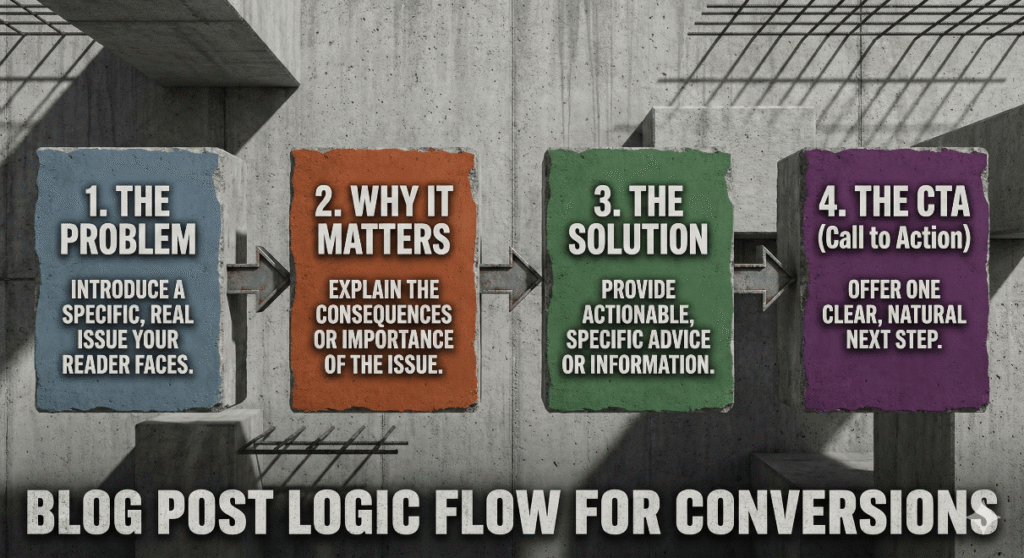
Step 1: Understand the “logic flow” of your post.
Every post follows a rough structure:
- You introduce a problem or topic
- You explain why it matters
- You provide the solution or information
- You give the reader a next step
Your CTA belongs at step 4. But you can also add softer CTAs earlier if they fit naturally.
Step 2: Match your CTA to the content.
Your CTA should feel like a continuation of what you just talked about, not a random pivot.
If you wrote about email marketing mistakes, your CTA might be: “Want to see what a high-converting email sequence looks like? I put together a free swipe file with five examples. Grab it here.”
If you wrote about starting a blog, your CTA might be: “If you’re tired of wrestling with hosting and tech setup, that’s exactly why we built Badass Network. You get a blog that’s already set up on a domain with real authority. Check it out.”
See how each CTA relates directly to what came before?
Step 3: Be direct about what you want.
Don’t hint. Don’t be vague. Tell them exactly what to do.
Bad: “If you enjoyed this post, maybe consider subscribing.” Good: “Want more posts like this? Enter your email below and I’ll send you one every week.”
Bad: “Feel free to check out our services.” Good: “If this sounds like what you need, book a free 15-minute call and let’s talk about your project.”
People appreciate clarity. They’re busy. They want you to tell them what to do next.
Step 4: Don’t overdo it.
One main CTA per post. Maybe a secondary one if it’s genuinely different (like “share this post” in addition to “subscribe”). But not five different asks scattered throughout. That’s just noise.
Where to place your CTA:
- End of post: This is the most common and usually most effective spot. They’ve read everything, they trust you, they’re ready for next steps.
- After a key insight: If there’s a moment in your post where everything clicks, that’s a great spot for a CTA. The reader is engaged and motivated.
- In a P.S.: Some people scroll straight to the bottom. A P.S. with your CTA catches those scanners.
Write Like You Actually Talk
Nothing kills conversions faster than sounding like a press release. Or worse, sounding like every other blog on the internet.
People buy from people. They sign up for newsletters from people they feel like they know. If your writing sounds corporate or generic, you’re creating distance between you and the reader. That distance makes them less likely to act.
How to actually do this:
Step 1: Read your writing out loud.
Literally. After you finish a draft, read it out loud to yourself (or to your phone, your dog, whatever). Every sentence that sounds weird or stiff or robotic? Mark it. Then rewrite it the way you’d actually say it.
This single habit will transform your writing more than any other tip I can give you.
Step 2: Use contractions.
“Don’t” instead of “do not.” “I’m” instead of “I am.” “You’ll” instead of “you will.”
Nobody talks without contractions. Writing without them sounds formal and distant.
Step 3: Start sentences with “And,” “But,” and “So.”
Your English teacher might have told you not to. Ignore that. In conversational writing, these transitions are natural. They make your writing flow.
“I thought the post would flop. But it ended up being our best performer that month.”
Sounds human. Sounds like something I’d actually say to you.
Step 4: Include your personality.
What makes you, you? Maybe you’re funny. Maybe you’re blunt. Maybe you tell stories about your kids or your terrible cooking experiments. Let that come through.
Sharon and I mention our setup (working from home near The Hague, using our 27″ iMacs, the fact that we’ve been at this since ’99). These details make us real. They make readers feel like they know us.
You don’t need to share everything. Just enough to have a voice that’s recognizably yours.
Step 5: Admit what you don’t know.
Nothing builds trust faster than honesty. “I’m not entirely sure why this works, but it does.” “We tried this and it flopped. Still not sure what went wrong.”
Readers can smell bullshit. When you’re honest about limitations, they believe you when you say something works.
What this sounds like:
Instead of: “It is advisable to implement these strategies in order to maximize conversions.”
Write: “Try this stuff. See what works for you. Some of it might not land, but most of it should move the needle.”
The second version sounds like a person. People trust people.
Putting It All Together
Writing blog posts that convert comes down to five things:
- One clear goal per post, decided before you write
- Scannable formatting that respects how people actually read online
- Real problems from real people, answered with specific solutions
- Strategic CTAs that feel like natural next steps
- Your actual voice, not some corporate robot impression
The hard part isn’t understanding this. The hard part is doing it consistently. Every post. Even when you’re tired or rushing or not feeling inspired.
That’s honestly one reason we built Badass Network the way we did. When you’re publishing on a subdomain with real authority, your posts actually get found. And that matters, because a post nobody reads converts nobody. The shared SEO advantage means you’re not starting from zero every time.
Plus the community keeps you accountable. Members share what’s working, ask questions when they’re stuck, help each other figure this stuff out in real time. It’s not just a platform. It’s a feedback loop.
If you want to skip some of the trial and error (and the technical headaches of setting up your own site), check out Badass Network and see if it fits what you’re trying to build. €25 a month gets you a hosted blog on our domain, access to the community, and all the SEO advantages that come with it.
Or take what you learned here and go do it yourself. Either way, you’ve got the roadmap now. Go write something that converts.